React.js
Think in components, keep state minimal, and build dynamic user interfaces that scale. Master the most popular library in the industry.
Overview
React is the tool we use to build UI with JavaScript.
Purpose
Build app UIs
React helps build interactive pages.
Prerequisite
Know JavaScript
React components are JavaScript functions.
Core idea
Use components
Break the UI into reusable pieces.
Watch For
React starts with JavaScript functions, then turns them into UI components.
React is the main UI tool.
JSX is JavaScript that looks like HTML.
Components are the building blocks.
function Thumbnail({ title }) {
  return (
    <button className="card">
      <img src="/react-overview.png" alt="" />
      <span>{title}</span>
    </button>
  );
}

export default function App() {
  return <Thumbnail title="React Overview" />;
}
SPA Workflow
An SPA loads a single HTML file once. JavaScript handles swapping the views without reloading the page.
Traditional vs Single Page Application
Multiple HTML files. Navigating requests a new page, causing a full reload.
One HTML file. JavaScript updates the content instantly.
UI Components
Components are the building blocks of React. They are reusable, encapsulated pieces of UI that manage their own logic and display.
Name components by what they are (UserCard, PriceTag), not how they look (BlueBox).
function Badge({ label }) {
  return <span className="badge">{label}</span>;
}

export default function App() {
  return <Badge label="New" />;
}
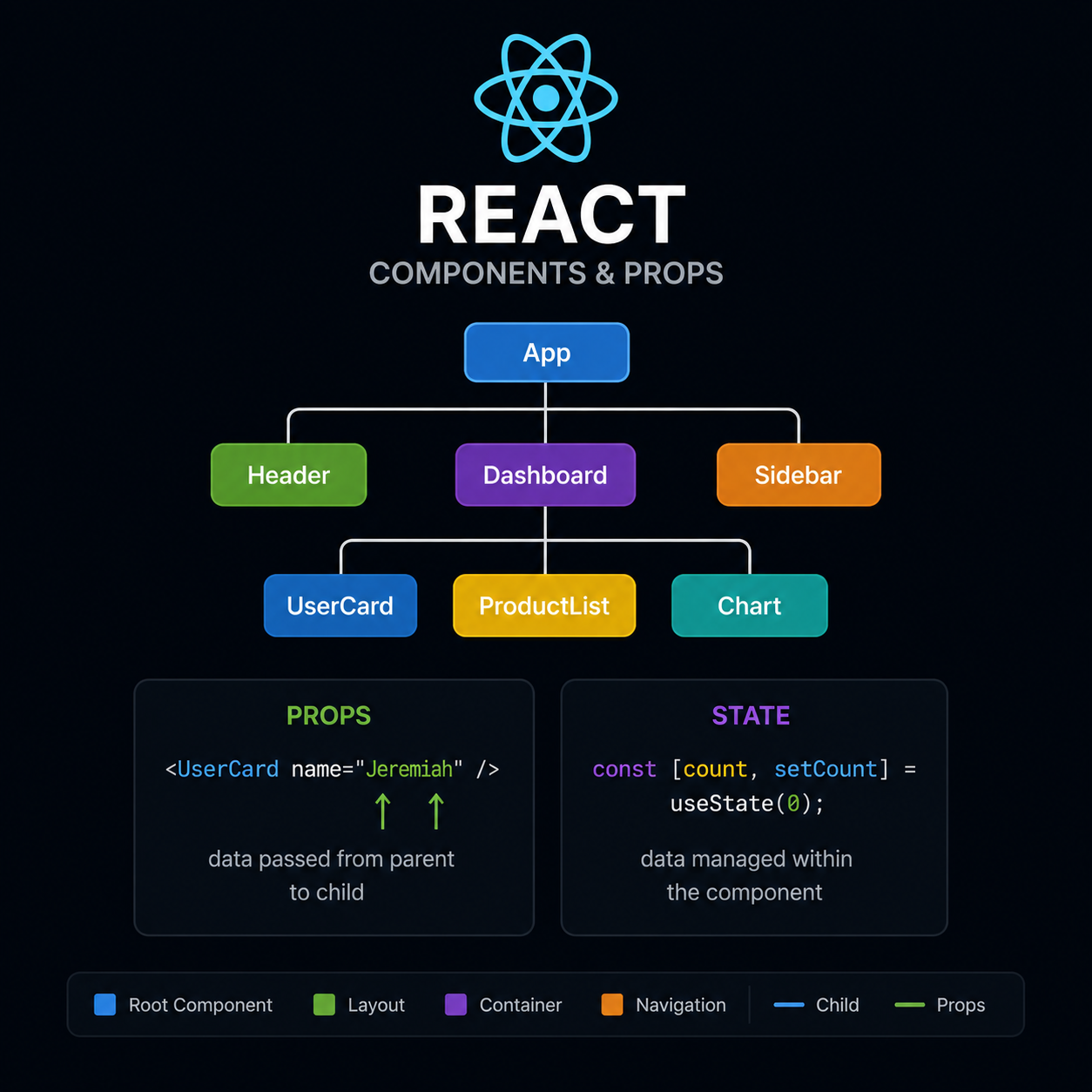
JSX Essentials
JSX looks like HTML, but it has the full power of JavaScript. Use curly braces to embed logic, and map for dynamic lists.
const items = ["HTML", "CSS", "JS"];

<ul>
  {items.map((item) => (
    <li key={item}>{item}</li>
  ))}
</ul>
Everything inside { } is pure JavaScript.
function ProductCard({ name, price, rating }) {
  return (
    <div>
      <h2>{name}</h2>
      <p>₱{price}</p>
      <span>{rating} Stars</span>
    </div>
  );
}

<ProductCard
  name="Mens Casual Premium Shirt"
  price={1200}
  rating={4.1}
/>
Props are Inputs
Props pass dynamic data from parents to children. They allow you to create one reusable component design and render it with different information.
Children cannot modify their props. Use state for data that changes over time.
Loop through API data and pass it as props to generate a list of identical UI cards.
Anatomy of a Reusable Component
State Management
State is the reactive memory of your app. Unlike vanilla JavaScript variables, when state changes, React automatically re-renders the UI to show the real-time updates.
Calling the setter function triggers a UI update instantly.
Returns an array with the current value and a function to update it.
Anatomy of useState()
useEffect Hook
Connect your component to external systems. Perfect for fetching API data, setting up subscriptions, or manually changing the DOM without causing infinite render loops.
useEffect(() => {
  const fetchData = async () => {
    const res = await fetch('/api/products');
    const data = await res.json();
    setProducts(data);
  };

  fetchData();
}, []);
"Why can't we just fetch outside?" If you fetch data directly in the component body, it triggers a state update, causing the component to render again... and fetch again. You will get stuck in an infinite render loop!
The Dependency Array
The effect runs only after the initial render. Perfect for fetching initial data from an API.
Inside the array are the variables that trigger the effect. If the num variable changes, it's going to run everything inside the hook again.
The effect runs after every single render. Rarely used and dangerous for API calls.
Using Async / Await
The useEffect hook cannot be async itself. Instead, you define an async function inside it to await your API results (like FakeStoreAPI) before saving them to state.
useEffect(() => {
  // 1. Define async function inside
  const fetchProducts = async () => {
    const res = await fetch('/api/products');
    const data = await res.json();
    setProducts(data);
  };

  // 2. Call it
  fetchProducts();
}, []);Event Handling
Interactive elements need event handlers. In React, events like onClick are written in camelCase, and you pass a function reference instead of executing a string.
<button
  onClick={() => {
    setCartItems(prev => [
      ...prev,
      newProduct
    ]);
  }}
>
  Add to Cart
</button>
When the user clicks "Add to Cart", we trigger the onClick event. Inside this handler, we take the previous state of cartItems, spread it out, and append the new product to the array!
Passing Functions as Props
"Props cannot only be a string or a number, you can also pass in a function!"
To connect the Cart Section and the Product Card, we pass the setCartItems state updater function down as a prop.
const [cartItems, setCartItems] = useState([]);

// Pass the function reference,
// don't execute it!
<ProductCard
  setCartItems={setCartItems}
/>function ProductCard({ setCartItems }) {
return (
<button onClick={() => setCartItems(...)}>
Add to Cart
</button>
)
}Conditional Rendering
How do we show an empty cart versus a full cart? We use conditions! In React, we rely on JavaScript's ternary operators and logical ANDs to dynamically swap out what gets rendered on the screen.
The Ternary Operator ? :
"This basically means there's a condition here. The question mark means if this is true, do this. Next here is the else."
{cartItems.length === 0
  ? <EmptyCart />
  : <ActiveCart />
}
Reusable Extraction
"We can use a reusable component again. So what we can do is create it here, a functional component called CardItem."
<CardItem item={item} /> CleanFetching Data (API)
The main job of the frontend is to display things from the backend. We use APIs (Application Programming Interfaces) to bridge that gap and pull data directly into our React application.
React Frontend
Where the user clicks and interacts with the UI.
Backend Database
Where the actual product data is securely stored.
Fake Store API
"The thing I like about this is how easy it is to set up... it doesn't require any access token or authentication. We just need the URL. Try it yourself, paste it in a new tab!"
[
  {
    "id": 1,
    "title": "Fjallraven - Foldsack No. 1 Backpack, Fits 15 Laptops",
    "price": 109.95,
    "description": "Your perfect pack for everyday use and walks in the forest...",
    "category": "men's clothing"
  },
  ...
]
Launch Sandbox
Ready to build something? Try fetching data yourself in our interactive React problem.